 |
| SEO Tips For Blogspot Blogs |
We already had enough conversation about BlogSpot or WordPress and for one reason I don’t like BlogSpot much is because the limitation of optimizing it for the search engine. There are many BlogSpot SEO guides that you will find on The Internet, and many of them are related to template editing and all, but in WordPress, plugins make it easier to optimize your blog.
 |
| Home www.blogger.com |
Anyhow, I’m not here to disappoint my BlogSpot friends. Instead, I will be sharing some cool BlogSpot SEO tips which will help you to get better ranking. Blog-Spot being a free Blogging platform, it’s always a preferred platform to start Blogging and learn the basics.
If you or a friend need step by step guide to creating a Blog, You can refer below link to him/her: How to create a Free blog on BlogSpot.
Google Blogger is free and easy to use web publishing tool. Many bloggers initially use Blogger and then Migrate to WordPress complaining about the lack of official templates, post SEO friendliness, plugins, etc., We have already discussed this in our previous post with the little effort we can make Blogger posts SEO friendly and an effective free medium for online business. So here I have collected some search engine optimization (SEO) tips for Blogspot blogs arranged in no order.
BlogSpot SEO: Useful Tips and Tricks
When we talk about SEO, very first thing which you need to keep in mind is: We can control on site and off site SEO. On Page SEO is covered by you which includes article quality, how well it’s optimized for Keyword and meta value for that article. No need, to feel furious or lost with above SEO terminology, as below mentioned guide will help you to learn every basic and make your Blogger blog more search engine friendly.- Keyword research for Beginners
- OnPage optimization for every Blogger
Format Blogger post URL link
Permalink plays a great role in search engine ranking of your post.
There are few rules which everyone should follow for Blogspot
permalinks:- Keep the number of characters in post title to 50
- Remove Stop Words from permalink (Ex: A, an the)
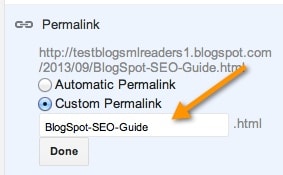 |
| Permalink Blogger |
Harsh has already covered this feature in detail, and you can read it over here: How to use the custom permalink for BlogSpot blogs.
Maintain the keyword density
Keyword density is an important aspect for better ranking. Too less
will lead to less ranking and stuffing your Keyword will lead to over
optimization. I usually maintain a ratio of 2%/post. Though, you can
pick keyword density for your Blogpost SEO, account to one which works
for you. Publish articles in relevance to post title and include
necessary keywords in the post. Never stuff keywords to manipulate
search engines. But after finish writing, you can analyze the whole post
to find out suitable locations where the keywords can be safely
inserted without distracting readers.Read: What is optimum Keyword density for Better Ranking
Blogspot proper labels and related posts
Label adds to the keyword density of the post. Labels should be
widened rather than putting them into the single narrow category.I will
explain this point by an example. Consider a situation when you are
posting about Google Chrome and putting them into label Windows
software’s or browser. Here you will miss keywords like Chrome browser,
Google chrome, etc. which would otherwise add to the keyword density of
the whole post. Labels also affect related posts widgets in Blogger.And
if there are so many posts tagged with similar labels, it would affect
the arrangement of articles in related posts.
Format Blogger post title
When we talk about BlogSpot SEO, post title plays a major role.
Blogger post title is usually followed by home page title. Have a look
at the image shown below. |
| Mozzila FireFox web browser |
title><data:blog.pagetitle/></title>and replace it with
<b:if cond= 'data:blog.pageType == "index"'> <title><data:blog.title/></title> <b:else/> <title><data:blog.pageName/></title> </b:if>Now the individual pages will have post title itself.
Format Blogspot images for SEO
We have already shared a detailed article on Image optimization for
SEO and basis of optimization your image on BlogSpot is by adding alt tag
and title tags in every image. In WordPress, this could be easily
achieved by using plugins but in BlogSpot, this needs to be done
manually. You should insert them manually after uploading each image.
Here is ShoutMeLoud popular guide on Image optimization for SEO.
Provide meta tags
Meta tags are generated HTML tags used by search engines to identify
the title, description, and other details of a URL. They don’t have much
influence on search as they were before, but would make a slight impact
on targeted keywords.Read: BlogSpot SEO advanced search preference
Provide good title, description, and footer text
The title, footer, and description plays an important role in search engine optimization of every blog. If you are targeting, some keywords make sure that you included those keywords in the above-mentioned locations.
Nofollow external links
Nofollow is an HTML attribute specified on hyperlinks to block search
engine advantage of external links in a website. In Blogger, you can
select HTML section of the post window and add rel=”nofollow” attribute
just after URL to prevent search engines from crawling a particular
link. Also read: How to add nofollow link attribute to any link.
Format comment section
The Comment section should be no-followed and moderated to avoid spam
comments. Try to include the post keywords when you are replying to
reader comments. This would also add up to the total keyword density of
the post. Since Google have integrated Google plus comment form with
BlogSpot, I highly recommend you to enable it. This will ensure that you
get higher social media interaction and share for your post.Read: How to enable Google plus commenting on BlogSpot blog
Blogspot is Google’s baby blogging platform, and if you do it right probably, you will be doing great regarding traffic. Always get your basic right.
If you like this article, don’t forget to tweet and stumble. Further, you might like to read Following articles for Blogspot blogs:
- Custom domain name for Blogspot blog
I hope this guide will give you a much better idea about BlogSpot SEO,
though my suggestion would be when you think you are ready with
Blogging and had enough experience on BlogSpot, move to WordPress. Here
is a wonderful guide for WordPress, which will help you to get started.
See more : How to get SEO blog 100%
See more : How to get SEO blog 100%